
Removing dust from the light source (Pictor)
First try to gently clean the visible part of the light source with a dry lint-free cloth or air-blower.
If dust particles remain visible, the light source can be partially dis-assembled for a more thorough cleaning:
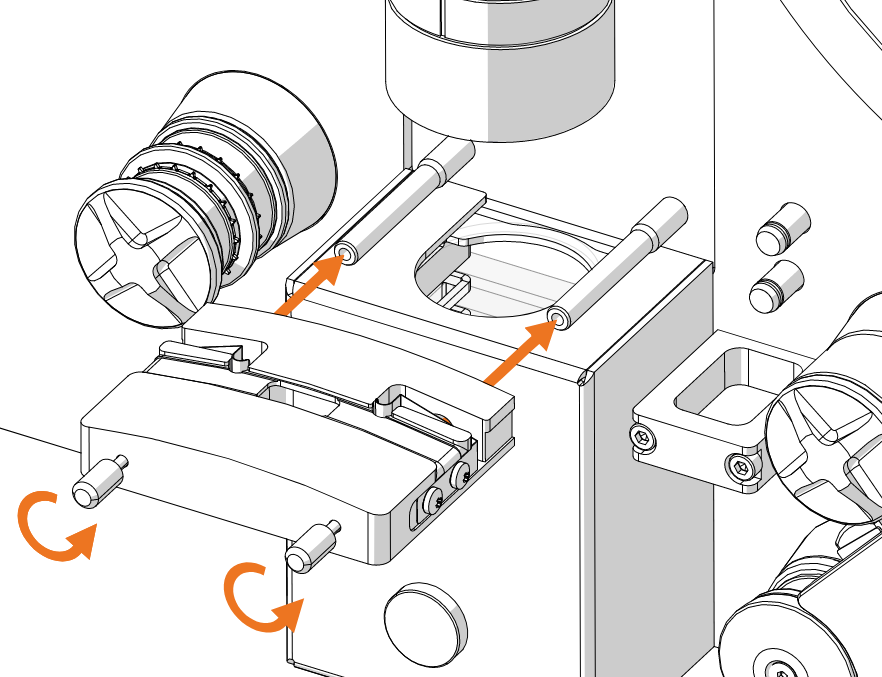
– Unscrew the two front screws of the film gate
– Pull the gate away from the scanner
– Clean the top of the lens with a lint-free cloth
To completely clean the lens and optical assembly, its cover can be removed by unscrewing its front plate and pulling it. This will reveal the lens holder as well as diffuser glass plates.
The lens can be carefully lifted and cleaned with a lens-cleaning agent then carefully put back in place. The diffuser glass plates can be cleaned with a lint-free cloth.
With the scanner turned off, use compressed-air to blow dust from the LED panel at the bottom of the assembly.