
How to install the Shuttle Express controller?
The scanner can optionnaly be controlled by a Shuttle Express controller.
To configure it, find the following installer in the software provided with your scanner and run it:
‘5.1. cdi_shuttle_win_2.12.exe’
Bind Shuttle Express to C2D
First connect the Shuttle Express to a free USB port
- Click in the taskbar:
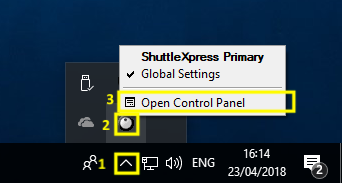
- Click ‘Options’ -> ‘Import Settings’
- Select C:\Program Files (x86)\Cine2Digits\Cine2Digits.pref
- Click ‘Open’
- Click ‘Options’ -> ‘Change target application’
- Select C:\Program Files (x86)\Cine2Digits.exe’
- Click ‘Open’
- Click ‘Apply’
- Click ‘Close’