
Transport or Audio issue: Conflict with another device (Pictor)
Some devices (e.g. BlackMagic DeckLink card) can cause conflict in the communication between the scanner and the computer.
The symptoms will be that either the sound or the mechanics of the Pictor will not work (commands in Cine2Digits will not respond).
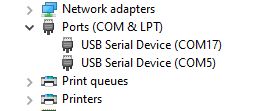
To check if this is the issue you are encountering, open the Windows “Device Manager” (type “Device Manager” in the Start menu) and look for the section “Ports (COM & LPT)”.
The Pictor uses one port for transport control and another for audio, both should be listed as “USB serial Device”:
When other devices are present, Windows does sometimes attribute the same port to two devices (see here COM3):
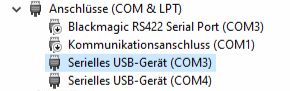
If this is the case, you can either disable the device causing a conflict with the Pictor (here the Blackmagic):
– Right-click on the device and choose “Disable”.
– You can enable it again when you need to use it and don’t need to scan anymore.
Or you can force the scanner to use another port:
– Choose the conflicted USB Serial Device.
– Right-click and choose “Properties”, then go to the “Port Settings” tab and click “Advanced…”.
– Select another COM Port Number and click “OK”.
– Restart Cine2Digits and make sure everything is working fine.